Heatmap
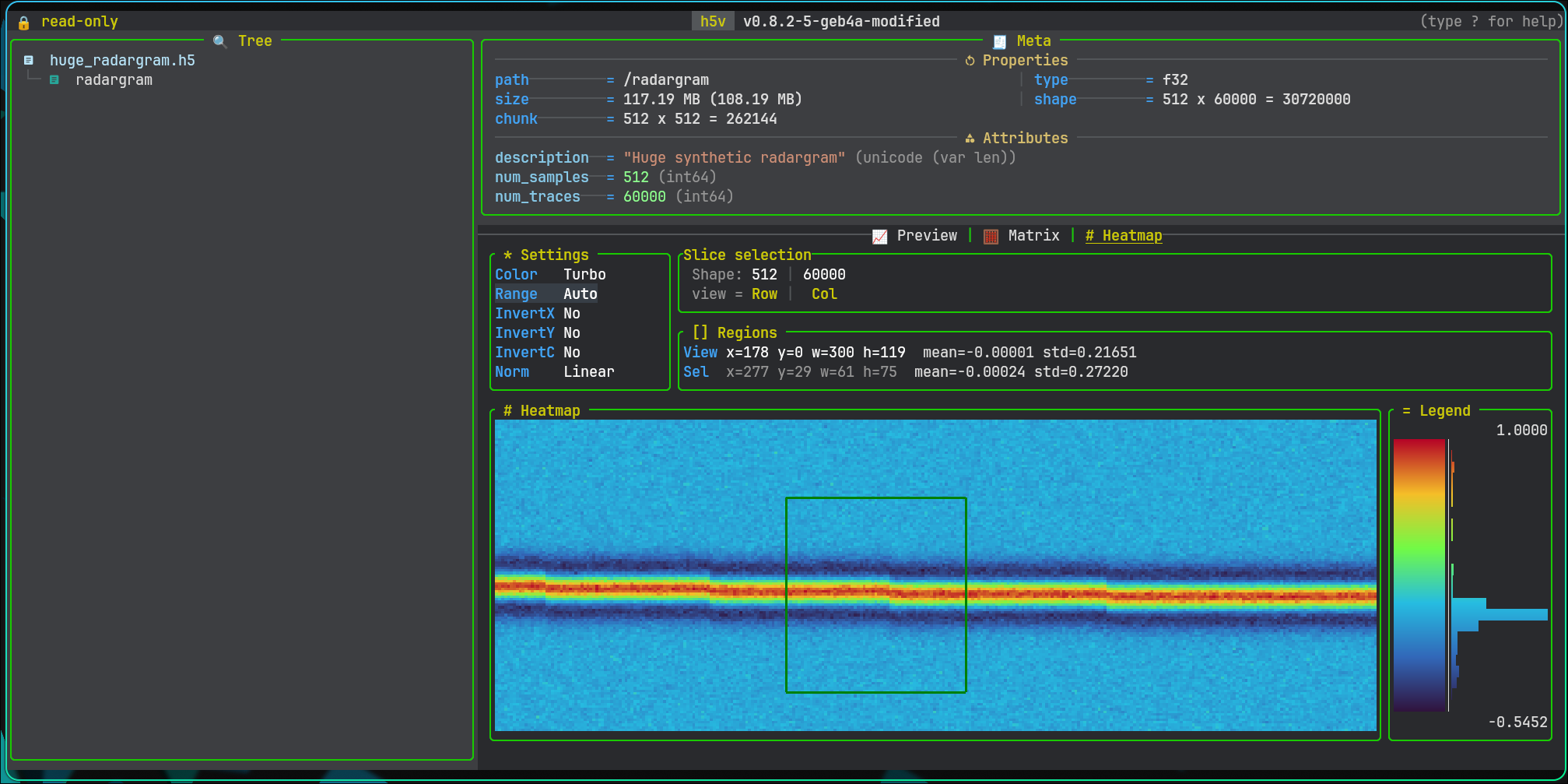
Heatmap is the image-style view for numeric datasets with at least two non-singleton dimensions.
It is available only when:
- compatibility mode is off
- terminal image rendering is available
What it shows
- a rendered 2D slice
- slice/page context
- settings
- viewport stats
- optional selection stats
- legend and histogram
Settings
The settings panel controls:
- colormap
- range mode
- invert x
- invert y
- invert colors
- normalization
Built-in range modes include Auto, MIN/MAX, Clip 1-99%, Sigma +-2sigma, and Winsor 2-98%.
Use Up / Down to move between settings and Left / Right to change the selected value. Click a settings row to focus it directly.
Selection and viewport
- no explicit selection means the active region is the current viewport
- one left click selects one terminal-cell region
- a second left click expands that to a rectangle
- another left click after a rectangle clears the explicit selection
The region panel shows both:
- viewport
x/y/w/h,mean,std - selection
x/y/w/h,mean,std
Zoom and pan
zzoom inZzoom out0reset viewportvclear explicit selectionH/J/K/Lpan the zoomed viewportPageUp/PageDownmove through segmented heatmap pages
Mouse
- left click selects a region
- wheel zoom is anchored to the hovered cell
- right click on an explicit selection zooms into that selection
- right-click drag pans the viewport
Commands and scripts
Heatmap uses the existing movement commands:
up/downleft/rightpage-up/page-down
Dedicated heatmap range commands:
heatmap range listheatmap range use "Clip 1-99%"heatmap range add 5% 80% "5-80%"heatmap range add 2.5 5.5 "2.5..5.5"
Zoom, reset, clear selection, and viewport pan are key-driven. In scripts, use press:
press zpress Zpress 0press vpress H
Copy
y copies the active heatmap summary:
- selection summary when a region is selected
- viewport summary otherwise
Configuration
Heatmap configuration:
- include
heatmapinh5v.content_mode_order - style shared panel/title colors through
h5v.colors - style shared symbols through
h5v.symbols - set
h5v.heatmap.default_range - set
h5v.heatmap.default_colormap - set
h5v.heatmap.default_normalization - set
h5v.heatmap.default_invert_x - set
h5v.heatmap.default_invert_y - set
h5v.heatmap.default_invert_c - add
h5v.heatmap.range_modes